I don't know how many of you are keeping up with this, even less most likely cause I just started this project so many are waiting to see if it goes anywhere, before they D dedicate any attention to it.
So in hopes to appease everyone lets talk about whats going to go into the E-Oc!
1.) First off everyone I am sure wants to know what case design I went with well an all around great guy over on The Ocarina Network Bunjiro was kind kind hook me up with a Solist 12 Hole, Alto C, I don't have it in my hand yet, but I think this will house our eletronics very nicely. I just hope I get to play it for a while before I have to rip it apart.. haha I think this will be the one time I will not be checking the mail box every day waiting on a package. ;)
If you guys have been living under a rock and don't know what this very pretty oc looks like here a picture of it

2.) The next thing that I know everyone is on the edge of their seat about is about how to do fingering, specifically if I am going to use buttons, or light sensors, or like touch pads. Well for the sake of prototyping you can not beat the low cost, and just general ease of use that comes from your standard buttons. That to be said I am not with out concern to making the prototype easy to use, So I have selected two different types of buttons. The ones I want to go with are the nice clicky buttons that you see in arcade games. Heres a picture:

They are only .99 cents each fromSpark Fun so you can not beat that! I will be picking up 12 of these! I am a little bit worried that these are just going to be to big for the case, I mean granted sense we don't have to worry about silly things like physics in an E-Oc, I will not mind using my good old dremial to make room, but I also dont want this thing to look like it came straight out of a child's toy store compliments of CAPCON yeah know?
So I have selected a set of back ups, these are just standard momentary switches like the ones above with nothing fancy, most likely they are going to be to small for the holes so some sort of back plating under them to keep them in place for pushing. Heres a picture:

They are only .50 cents each so I will be ordering 12 of these too, I have a few on me already but if I am going to place an order might as well get them all just in case one goes bad (happens some times).
3.) Alright guys lets talk brains, what is going to make everything happen for us? Well thats easy, we are going to use a pretty popular micro controller solution called Arduino, these things are god sends for people trying to do hobby electronics, it is kind of "easy" mode for this stuff, because it has a lot of little tedious stuff that would need to be already done for you, so it makes it really easy to working on the meat of our project. Plus you can get them all different shapes and sizes so stuffing one in an our Oc case will not be hard. Heres a pic:
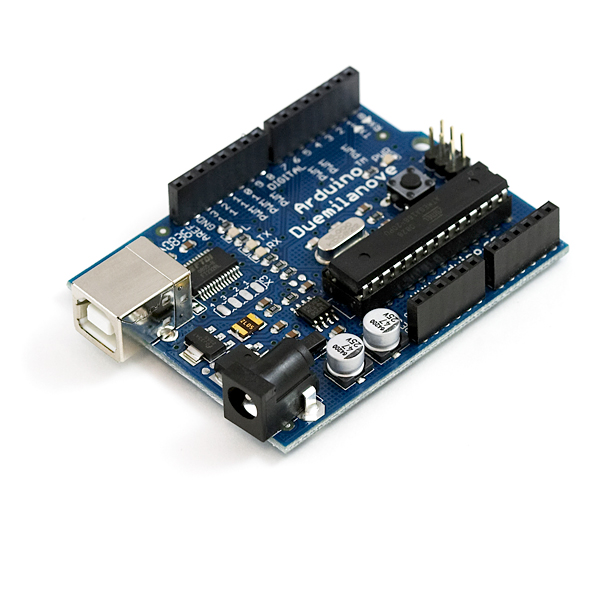
That one is all ready to go, and will be great for testing, it takes a standard 12 volt in, which for starters I will use just a standard wall plug, but later on we will add a battery, once the prototype is done and we start "slimming" stuff down.
Our development board costs more then our chip, the board runs $30 bucks, on spark fun. Once we get it working on a dev board, we can flash straight to chips, and the chips are only about $8 bucks each.
Ok, basically this is the thing the buttons plug into, the thing that the E-Oc code will run on, and is just generally the brain/computer that will drive our E-Oc.
4.) The next thing we need to look at is what is going to drive our sounds, there are a shit ton of options here, and prices can get pretty steep depend on what features you are looking for, well for our case we just want something that has volume control both digital and analog (digital means that you can control volume through programming and analog means it takes physical force to change volume, aka a wheel)
I will be picking up a wave shield for our arduino, basically what this is, is a solution that "plugs" into our arduino board above, and provides everything that we need to make our Oc sounds, the great thing is that it holds our sounds on an SD card! Which means that for testing we can try a verity of different OC recordings to get the best sound possible. It also means switching sounds, for chambers, tuning, or pitches, is as simple as just replacing the sound effects.
These bad boys are only $22 on Adafruit
Heres a pic of it plugged into the arduino:

Later on, we will be using a MIDI stereo chip for things like sound channels and our sound effects will be synthed via this chip, which means that we wont have to do any recordings, and pitch changes will be a breeze. The hard part is using a MIDI chip requires a rather large amount of code, and TONS of testing just to get things working right. So for now we will go with the above wave chip.
5.) Last but not least, we need a way to sense if the user is blowing, to well make noise, basically what happens is when this item senses pressure from the air it sends a signal to our micro controller, the stronger the pressure the more signal it sends (It does this via sending an amount of voltage to the micro controller, its a very small small amount, but its enough) So our micro controller reads the amount of pressure and then we set the volume on our WAVE chip, digitally based on the amount of voltage that the senser sends to the micr contorller. Sounds simple right!?!? One thing I am worried about is finding a unit that can easly go in our cases mouth piece, and most likely something that needs to be decently water proof. I have looked at a couple and have not made up my mind yet, but here is a picture of the one I am thinking about.

These things are like $25 bucks from Spark Fun
So, I really don't want to short a few of these out from spit, but I got to order two just in case, I hate having a project put on hold just because a part goes bad.
So, thats really about all we need to get started guys, anything else I most likely already have, and will just be small stuff that I have over looked, to make something work well.
So lets see cost to prototype:
1.) 24 buttons in two styles - $30 shipped
2.) Arduino Dev Board - $40 shipped
3.) Arudino Wave Shield - $30 shipped
4.) Ocarina Casing - FREE (Again, thank you Bunjiro)
5.) 2x Air Pressure Sensor - $50 Shipped
Total = +/- $150 to get everything shipped. Not to bad but not really in my budget. I have a copy of the arduino board, but I use it so often for various things, and with this type of thing, its going to be pretty attached to the Oc so, I will need to get me a new one.
So, as much as I hate asking, if anyone wants to do donate to the project, pm me, and I will give you guys my address, feel free to order any of the above parts and get them shipped to me. Though, please let me know before you order so that we can work on getting all of the parts needed, and not duplicates.
Well guys thats about it for this one, I have out lined the parts I have choicen as well as the reasons why, I hope everyone is as interested in reading this as much as I am on writing it!
Stay Tuned guys, the next one I do will be
Software Design
Here I will detail, the designs for the software that will drive our E-Oc and basically how everything will work software side.


No comments:
Post a Comment